1. System Overview
The Blade Profile Generation System creates fixture blades that precisely conform to part geometry. A blade is a flat steel plate that supports a part during waterjet or laser cutting operations. The blade must:
- Pass through the part at a specified position and angle
- Have cutouts matching the part's cross-section at that location
- Support compound angles (not just orthogonal X/Y/Z orientations)
- Handle hollow parts with multiple disconnected profile regions
Key Innovation: Dual-Section Method
Unlike simple projection-based approaches, this system sections the part at both faces of the blade (front and back), then combines the profiles. This correctly handles compound angles where front and back sections differ.
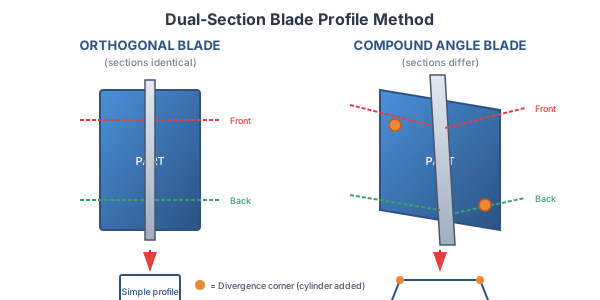
2. Prerequisites & Limitations
The blade profile system requires either watertight (solid) geometry or careful blade positioning. Blades that pass through hollow/open regions of non-watertight parts will produce artifacts.
Understanding the Problem
When a blade plane passes through the hollow interior of an open part (e.g., an open-topped box), the sectioning operation produces multiple disconnected wall profiles. The mosaic algorithm then tries to combine these profiles, but creates spurious "gap" regions between the wall sections that don't correspond to actual part material.
Two Solutions
Option 1: Make the Part Watertight (Recommended)
Close any open faces on the part before blade generation. Use SLD FAC REM or similar hole-closing commands to cap open regions:
- Ensures all sections produce clean, closed profiles
- Works with any blade position/orientation
- Most robust solution for production use
'*** Close holes in part before blade generation
sld fac rem none i_openFaceSet 0 0 0 1 0 0 i_ret
Option 2: Position Blades to Avoid Hollow Regions
If making the part watertight is not practical, ensure blade planes only intersect solid material:
- Position blades through walls, ribs, or solid features
- Avoid blade planes that pass through empty cavities
- Suitable for simple open parts with predictable geometry
Detecting Failures
If a blade cuts through hollow regions, the system may produce:
- Diagonal strip artifacts on the blade surface
- Incomplete cuts through the part
- Multiple overlapping cutout regions
- Unexpected sheet body counts in debug output
Check the "Using X filtered mosaic kurve(s)" message. If this number is unexpectedly high or includes many small-area kurves, the blade may be passing through hollow geometry.
Summary of Requirements
| Part Type | Requirement | Notes |
|---|---|---|
| Watertight solid | None - works with any blade position | ✓ Best case |
| Open part (box, channel, etc.) | Close holes OR position blades through solid walls only | ⚠ Requires preparation |
| Complex hollow part | Must make watertight before blade generation | ⚠ Use SLD FAC REM |
3. Architecture & Workflow
High-Level Workflow
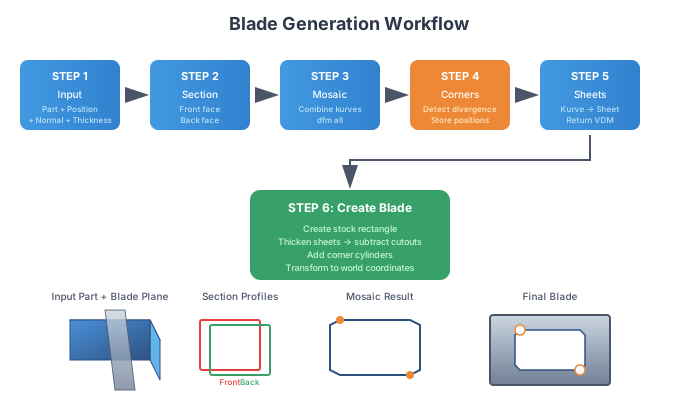
Coordinate Systems
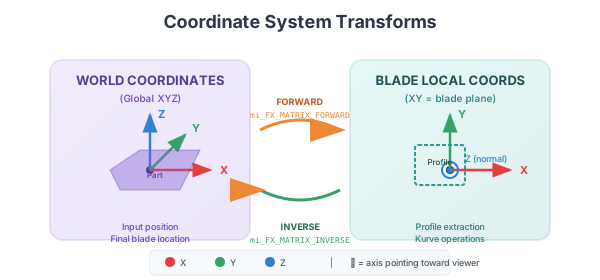
The system uses two coordinate systems:
| Coordinate System | Description | Use |
|---|---|---|
| World Coords | Global XYZ of the CAD model | Input parameters, final blade position |
| Blade Local Coords | XY = blade plane, Z = blade normal | Profile extraction, kurve operations, cutout creation |
Transforms are stored in matrix variables:
mi_FX_MATRIX_FORWARD- World → Local (for profile extraction)mi_FX_MATRIX_INVERSE- Local → World (for final positioning)
4. Orthogonal Blade Generation
Orthogonal blades have normals aligned with X, Y, or Z axes. These are the most common case.
Characteristics
- Normal vector: (1,0,0), (0,1,0), or (0,0,1)
- Front and back sections are identical
- Mosaic may produce degenerate output (handled automatically)
- No divergence corners
- Fastest processing path
Transform Method: Theta Rotation
For horizontal normals (Z component ≈ 0), uses simple theta rotation:
'*** Calculate rotation angle from normal
w_theta = atn2(w_normY w_normX)

'*** Forward transform: world -> local
set mi_FX_MATRIX_FORWARD
translate mi_FX_MATRIX_FORWARD x(-w_centerX) y(-w_centerY) z(-w_centerZ)
rotate mi_FX_MATRIX_FORWARD z(0-w_theta)
rotate mi_FX_MATRIX_FORWARD y-90
Degenerate Mosaic Handling
When front/back sections are identical, mosaic produces zero-area line segments instead of closed regions. The system detects this and falls back to using the largest original kurve:
'*** Check if mosaic produced valid kurves
i_mosaicResult = 0
if i_mosaicCount > 0 then
   for i_mosaicIdx = 0 to i_mosaicCount - 1
      get k(i_mosaicOutStart + i_mosaicIdx) D i_numSpans w_perim w_area
      if abs(w_area) > 0.0001 then
         i_mosaicResult = 1
      end if
   next
end if
5. Compound Angle Blade Generation
Compound angle blades have normals that aren't axis-aligned (e.g., 45° in XY plane, or arbitrary 3D angles).
Characteristics
- Normal vector has multiple non-zero components
- Front and back sections differ
- Mosaic produces valid combined regions
- Divergence corners occur at profile edges
- Requires full dual-section processing
Transform Method: Euler Angles
For general 3D normals (Z component ≠ 0), uses Euler angle decomposition:
'*** Calculate Euler angles
w_rotY = atn2(w_normX w_normZ)
w_xzMag = (w_normX*w_normX + w_normZ*w_normZ)@0.5
w_rotX = 0 - atn2(w_normY w_xzMag)

'*** Forward transform: world -> local
set mi_FX_MATRIX_FORWARD
translate mi_FX_MATRIX_FORWARD x(-w_centerX) y(-w_centerY) z(-w_centerZ)
rotate mi_FX_MATRIX_FORWARD x(0-w_rotX)
rotate mi_FX_MATRIX_FORWARD y(0-w_rotY)
Section Face Detection
After subtracting cutting sheets from part copies, finds section faces by:
- Iterating all faces on new bodies
- Checking face class = 4001 (planar)
- Computing dot product of face normal with blade normal (must be > 0.90)
- Checking distance from blade center (must be within halfThick + tolerance)
6. Divergence Corner Clearance
When front and back blade sections differ (compound angles), their profiles diverge at corners, creating sharp internal angles that could collide with the part.
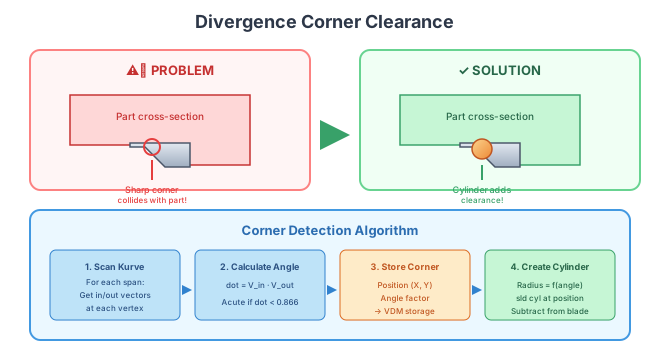
Configuration Variables
| Variable | Type | Default | Description |
|---|---|---|---|
w_FX_PROFILE_CLEARANCE |
float | 0 | Master enable: 0 = OFF, >0 = clearance radius for edge blends |
w_FX_DIVERGENCE_RADIUS |
float | 0 | Cylinder radius. 0 = auto (half blade thickness) |
i_FX_DIVERGENCE_SCAN_MODE |
int | 0 | 0 = largest kurve per island, 1 = all outer kurves |
i_FX_BLEND_INTERNAL_EDGES |
int | 0 | 1 = apply fillet to internal blade edges |
Corner Detection Algorithm
'*** Scan kurve spans for acute corners
for i_spanIdx = 1 to i_spanCount
   '*** Get incoming and outgoing vectors
   '*** Calculate dot product (corner angle)
   w_dotCorner = w_vecInX * w_vecOutX + w_vecInY * w_vecOutY

   '*** Acute corner if dot < 0.866 (angle > 30° from straight)
   if w_dotCorner < 0.866 then
      '*** Store corner position and angle in VDM
      write $_scratch w_cornerX w_cornerY w_dotCorner
      vdm add i_cornerVDM i_cornerCount $_scratch 1
   end if
next
Angle-Based Radius Scaling
Sharper corners get larger cylinder radii:
'*** Base radius = 0.7 * half thickness
w_cornerRadius = w_halfThick * 0.7

'*** Scale for sharper corners (dot < 0.866)
if w_cornerDot < 0.866 then
   w_angleScale = 1.0 + 1.0 * (0.866 - w_cornerDot) / 1.866
   w_cornerRadius = w_cornerRadius * w_angleScale
end if
7. Global Variables Reference
Debug & Output Control
| Variable | Values | Description |
|---|---|---|
i_FX_DEBUG_LEVEL |
0, 1, 2 | 0 = silent, 1 = progress, 2 = verbose diagnostics |
i_FX_KEEP_CUTOUT_BODIES |
0, 1 | 1 = don't delete cutout bodies (for visual debugging) |
$_FIXTURE_PERSISTENT_MESSAGE |
string | Message buffer for fxPrintStatus output |
Profile Generation
| Variable | Type | Description |
|---|---|---|
w_FX_PROFILE_CLEARANCE |
float | Clearance/blend radius for divergence handling |
w_FX_DIVERGENCE_RADIUS |
float | Cylinder radius override (0 = auto) |
i_FX_DIVERGENCE_SCAN_MODE |
int | Corner scan mode (0 = largest, 1 = all) |
i_FX_BLEND_INTERNAL_EDGES |
int | Enable edge filleting |
Fouling Check
| Variable | Values | Description |
|---|---|---|
i_FX_FOULING_CHECK_MODE |
0, 1, 2 | 0 = OFF, 1 = AUTO (compound only), 2 = always check |
Internal State (Do Not Modify)
| Variable | Description |
|---|---|
mi_FX_MATRIX_FORWARD |
World → Local transform matrix |
mi_FX_MATRIX_INVERSE |
Local → World transform matrix |
i_FX_DIVERGENCE_CYL_SET |
VDM handle for corner positions |
i_FX_DIVERGENCE_CYL_COUNT |
Number of corners detected |
8. File Reference
Core Blade Generation
Support Utilities
Testing
9. Utility Macros
fxWindow - Window State Control
Controls graphics window updates for performance. Window updates are expensive during heavy geometry operations.
'*** Turn window off for batch operations
call fxWindow 0

'*** ... heavy geometry work ...

'*** Restore window
call fxWindow 1

'*** Check mode - verify expected state (debug)
call fxWindow -1 0 'callerMacroName'
fxPrintStatus - Formatted Output
Outputs timestamped messages with caller identification:
write $_FIXTURE_PERSISTENT_MESSAGE 'Processing blade 5 of 12...'
call fxPrintStatus 'fxMyMacro'

'*** Output: [timestamp] [fxMyMacro] Processing blade 5 of 12...
fxProgressPie - Visual Progress Indicator
Creates a pie-chart style progress indicator using 8 colored segments:
'*** Initialize
call fxProgressPie 0

'*** Show progress (1-8 segments)
call fxProgressPie 3   '*** 37.5% complete

'*** Cleanup when done
call fxProgressPie -1
10. Testing & Debug
Test Modes
The test macro fxTestCreateBlade.ovm supports 5 blade orientation modes:
| Mode | Normal Vector | Description |
|---|---|---|
| 0 | (1, 0, 0) | Perpendicular to X axis |
| 1 | (0, 1, 0) | Perpendicular to Y axis |
| 2 | (0, 0, 1) | Perpendicular to Z axis |
| 3 | (0.707, 0.707, 0) | 45° in XY plane (compound) |
| 4 | (0.577, 0.577, 0.577) | 3D diagonal (compound) |
Debug Levels
Set i_FX_DEBUG_LEVEL in fxGlobals.var:
| Level | Output |
|---|---|
| 0 | Silent - only errors and final result |
| 1 | Progress - step names, counts, key values |
| 2 | Verbose - face details, kurve info, bounding boxes, transform matrices |
Visual Debugging
Set i_FX_KEEP_CUTOUT_BODIES = 1 to preserve intermediate geometry:
- Profile sheets (green)
- Divergence cylinders (magenta)
- Cutout bodies on temp layer
view extents after setting debug level 2 to see intermediate geometry before it's transformed or deleted.